Setting Up a HomeLab Server with CasaOS – The Easiest One-Touch Deployment


If you’re looking for the simplest way to set up a HomeLab server without diving deep into command lines and complex configurations, CasaOS might be the perfect solution. CasaOS is an open-source, lightweight, and user-friendly platform that makes managing your home server as simple as using an app store. It runs on top of Docker and provides a clean web-based GUI for managing applications, media, files, and more.
Whether you’re using an Ubuntu server on a Mini PC or a Raspberry Pi, CasaOS offers a quick one-touch deployment and gives you the power of Docker with the simplicity of a point-and-click interface.
Why Choose CasaOS for Your HomeLab?
- Easy Installation – A single command sets up your entire server.
- Docker App Store – Browse and install popular apps like Plex, Jellyfin, Nextcloud, Home Assistant, and more directly from the GUI.
- File Manager Built-In – Manage, upload, and share your files via a web-based file manager.
- Cross-Platform – Works seamlessly on x86 PCs, ARM devices, and Raspberry Pi.
- User-Friendly Dashboard – No need to memorize terminal commands; everything is visually accessible.
Installing CasaOS on Ubuntu
If you already have an Ubuntu 22.04/24.04 server or VM running, installation is as simple as running one command:
curl -fsSL https://get.casaos.io | bash
This script will automatically:
- Install Docker and Docker Compose
- Configure CasaOS
- Start all required services
Once the installation is complete, open your browser and go to:
http://<your-server-ip>:80
You’ll see the CasaOS dashboard and be prompted to set up your account.
Installing CasaOS on Raspberry Pi
Running CasaOS on a Raspberry Pi (Pi 4 or Pi 5 recommended) is just as easy.
- Start with a fresh Raspberry Pi OS Lite (or Ubuntu Server for Pi).
- Update your system:sudo apt update && sudo apt upgrade -y
- Install CasaOS with the one-touch script:curl -fsSL https://get.casaos.io | bash
That’s it! CasaOS will automatically configure itself and you can access it via your Pi’s IP address.
Once the installation is complete, open your browser and go to:
http://<your-server-ip>:80
Managing Docker Applications with GUI
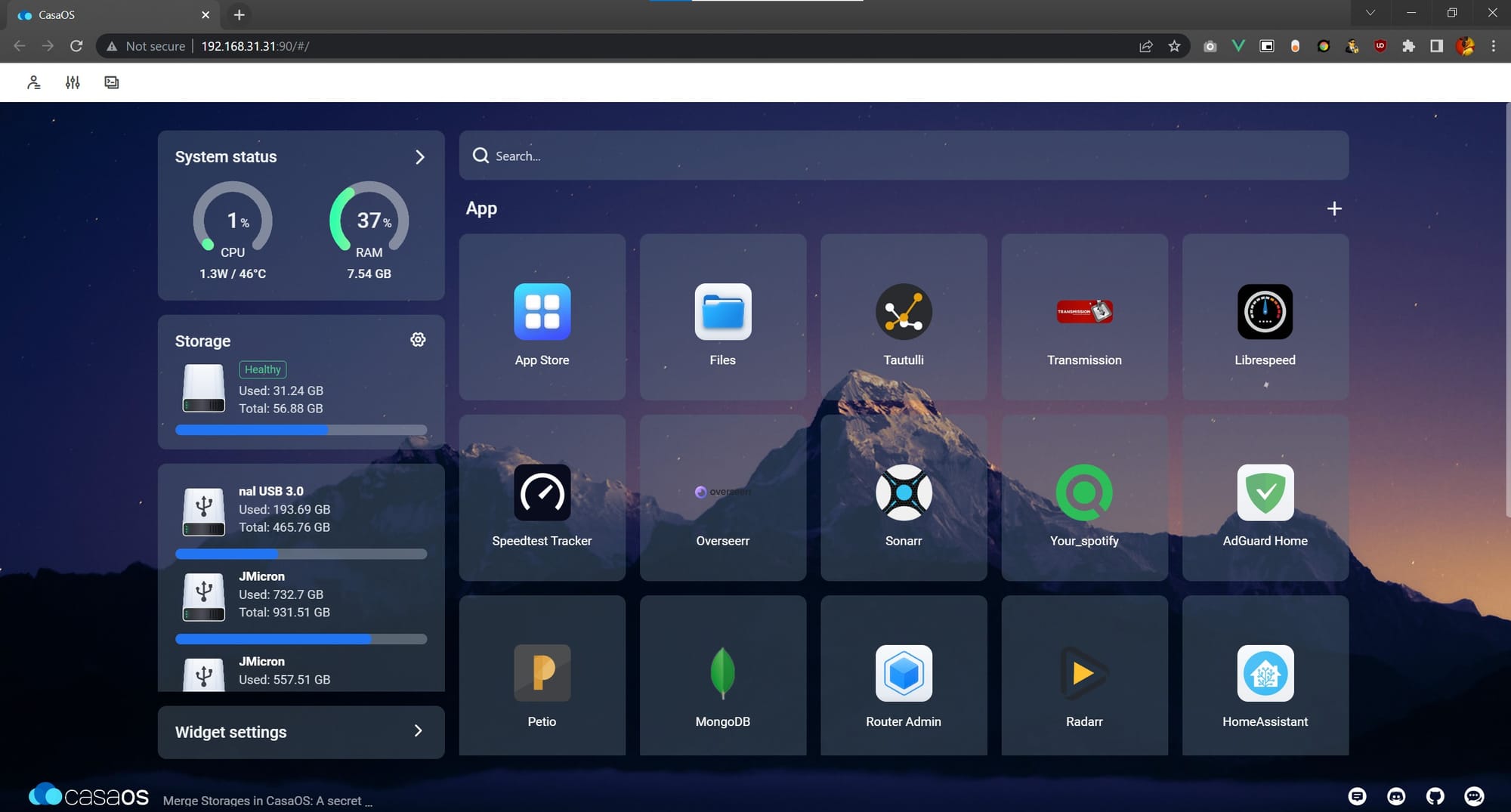
Traditionally, Docker requires you to run commands like docker run, docker ps, or write complex docker-compose.yml files. With CasaOS, everything is managed visually:
- Go to the App Store from the dashboard
- Choose your desired application (e.g., Nextcloud, Jellyfin, AdGuard Home)
- Click Install
CasaOS will handle the Docker container setup automatically. You can then launch and manage apps from your dashboard—no terminal required.
Built-In File Manager
One of the best features of CasaOS is the File Manager. With it, you can:
- Upload and download files directly from the browser
- Organize your data in folders
- Share files across your network without setting up extra services
- Access media for apps like Jellyfin or Plex
It makes your HomeLab act like a mini-NAS (Network Attached Storage) right out of the box.
Final Thoughts
CasaOS is a fantastic starting point for anyone new to HomeLabs or self-hosting. It provides a plug-and-play server experience with all the flexibility of Docker but without the learning curve. Whether you’re hosting media, files, or self-hosted applications, CasaOS makes it incredibly simple.
If you’ve been holding back from starting your HomeLab because Docker and Linux seemed intimidating, CasaOS will change your mind. With just one command, you can transform a Raspberry Pi or Ubuntu server into a powerful, user-friendly HomeLab server.
Thank you so much for taking the time to read my blog! Your support and engagement truly mean a lot and inspire me to keep creating and sharing more valuable content. If you enjoyed this post, I’d love to hear your thoughts—feel free to leave a comment in the box below and join the conversation. And if you’d like to stay updated with the latest posts, tips, and insights, don’t forget to subscribe to my newsletter. By joining, you’ll be the first to know when new content is published, so you never miss an update.
Collectors often read football history through collars, sponsors, badges, and colour patterns as collections often grow around teams, eras, and memorable fixtures. Fans comparing Bundesliga shirts often look at the relationship between team identity, design, and tournament pressure. Those exploring club collections may also consider, Real Madrid home shirt is relevant to conversations about collecting, matchday wear, and kit design. When classic designs return, the design becomes part of how football culture is remembered.